
Image recognition has become an important part of modern artificial intelligence (AI), helping computers understand and interpret visual information. From identifying products in online stores to recognizing objects in security footage, this technology is now used across many industries. One of the biggest reasons behind its growing popularity is the availability of pre-trained models in image recognition, which allow developers to build intelligent applications without training an entire AI system from scratch.
Instead of spending weeks or months collecting images and developing a machine learning model, developers can start with an existing model that has already learned useful visual features from large datasets. They can then use it directly or fine-tune it for a specific purpose. This approach saves development time, reduces computational requirements, and makes computer vision more accessible to businesses and individuals.
However, not every image recognition model performs the same task. Some models classify an entire image, while others identify individual objects, locate people, recognize text, or separate objects from their backgrounds. Understanding these differences is essential when choosing the right solution.
What Is Image Recognition?
Image recognition is a branch of computer vision that enables computers to identify and interpret objects, people, places, text, and other visual elements within digital images. It commonly uses machine learning and deep learning algorithms to analyze image data and generate predictions.
For example, an image recognition application could identify a dog in a photograph, recognize a vehicle in a traffic camera image, or extract printed information from a scanned document. More advanced systems can identify several objects in the same image and determine their exact locations.
Although image recognition and image classification are closely related, they are not exactly the same. Image classification generally assigns one or more labels to an entire image. Object detection goes further by identifying individual objects and locating them using bounding boxes. Image segmentation can provide even more detailed information by identifying the specific pixels belonging to each object.
What Are Pre-Trained Models in Image Recognition?
A pre-trained image recognition model is an AI model that has already been trained on a large collection of images. During its initial training, the model learns to recognize visual patterns such as edges, shapes, textures, colors, and more complex object features.
Once training is complete, the model’s learned weights can be reused for other image recognition tasks. Developers can use the existing model as it is, or apply a technique called transfer learning to adapt it to a new dataset and specific requirements.
For example, a model originally trained to recognize thousands of everyday objects can be fine-tuned to identify different types of products in an online store. This is usually more practical than building and training a completely new model with randomly initialized weights.
Top 5 Pre-Trained Models in Image Recognition
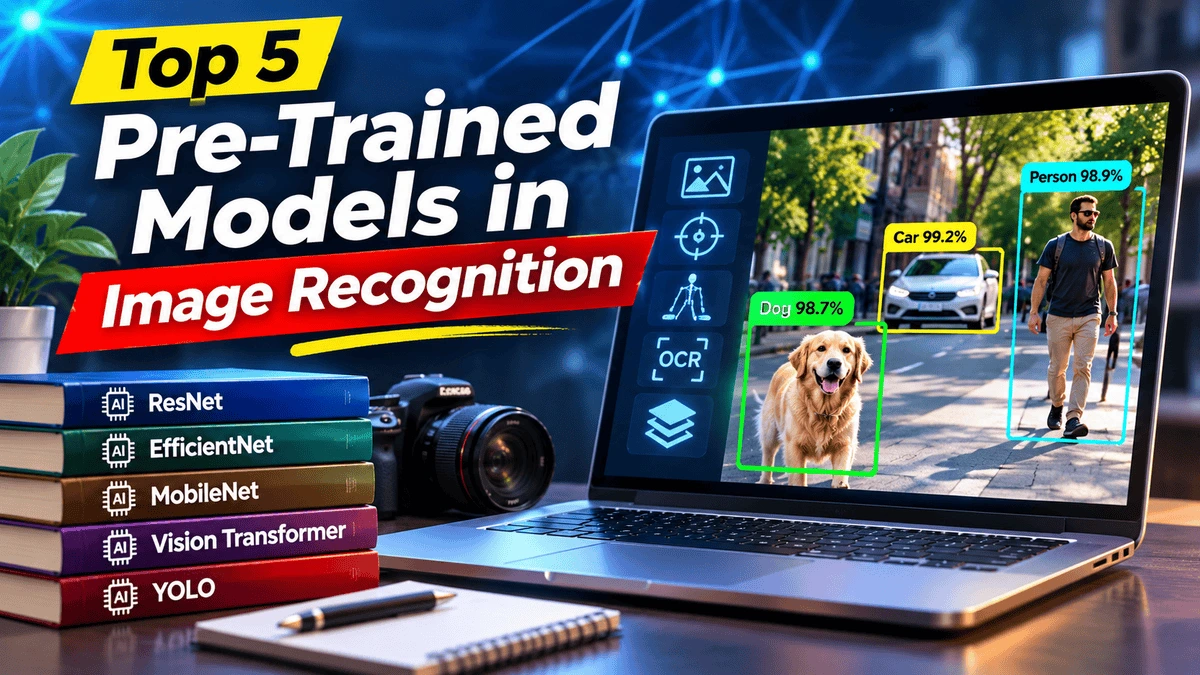
There are many image recognition architectures available today. The following five model families are particularly useful for understanding modern computer vision applications. They cover different requirements, including image classification, mobile image processing, advanced visual understanding, and real-time object detection.
1. ResNet (Residual Neural Network)
ResNet, short for Residual Network, is one of the most influential deep learning architectures used in computer vision. Introduced in 2015, it addresses a common problem encountered when training very deep neural networks: the difficulty of optimizing networks as their depth increases.
ResNet uses special connections called residual or skip connections. These connections allow information to pass through different layers without following every processing step. As a result, deeper networks can learn more complex visual features while reducing some of the optimization difficulties associated with traditional deep neural networks.
Popular versions include ResNet-18, ResNet-34, ResNet-50, ResNet-101, and ResNet-152. These models offer different levels of computational complexity, allowing developers to select a suitable architecture depending on their available hardware and accuracy requirements.
Common applications include:
- Medical image classification and research.
- Product and object recognition.
- Image classification systems.
- Visual inspection in manufacturing.
- Feature extraction for custom computer vision applications.
ResNet is a useful starting point for developers who need a well-established image classification architecture. Pre-trained ResNet weights are available through libraries such as PyTorch TorchVision.
2. EfficientNet
EfficientNet is a family of convolutional neural networks designed to balance model accuracy and computational efficiency. It was developed to address the challenge of making image recognition models more accurate without unnecessarily increasing their size and processing requirements.
One of its main features is compound scaling. Instead of increasing only the depth or width of a neural network, EfficientNet scales the network’s depth, width, and input image resolution together in a balanced way.
The EfficientNet family includes multiple versions, starting with smaller models such as EfficientNet-B0 and extending to larger variants such as EfficientNet-B7. EfficientNetV2 is another development that focuses on improving training efficiency and model performance.
Common applications include:
- Automated product classification.
- Image-based quality inspection.
- Plant and crop image analysis.
- Medical image research.
- Large-scale image categorization.
EfficientNet is worth considering when a project needs a balance between predictive performance and resource consumption. However, the best variant depends on image resolution, hardware, dataset characteristics, and the required processing speed.
3. MobileNet
MobileNet is a family of lightweight neural networks developed for applications that need image recognition on mobile devices and other hardware with limited computing resources. Unlike larger architectures that may require powerful GPUs, MobileNet is designed to reduce computational cost while maintaining useful recognition performance.
One of its key techniques is depthwise separable convolution. This approach separates standard convolution into two smaller operations, reducing the number of calculations and model parameters required during processing.
Different generations include MobileNetV1, MobileNetV2, and MobileNetV3. Each generation introduces architectural improvements intended to make visual recognition more efficient on resource-constrained devices.
Common applications include:
- Mobile image recognition applications.
- Smart cameras and embedded devices.
- Real-time image classification.
- Internet of Things (IoT) applications.
- On-device visual inspection.
MobileNet is particularly useful when processing speed, memory consumption, and deployment costs matter. It is a practical option for developers building applications that need to run directly on smartphones or edge devices.
4. Vision Transformer (ViT)
Vision Transformer, commonly known as ViT, introduced a different approach to image recognition by applying transformer architecture to visual data. Traditional convolutional neural networks process images using convolutional filters, whereas ViT divides an image into smaller patches and treats these patches as a sequence of visual tokens.
These image patches are processed using self-attention mechanisms, allowing the model to learn relationships between different parts of an image. This helps it capture broader visual context rather than relying only on local image features.
Vision Transformers have become an important part of modern computer vision research and are widely used for image classification and other visual tasks. Their performance depends on the model size, training data, pre-training method, and fine-tuning strategy.
Common applications include:
- Advanced image classification.
- Medical image analysis research.
- Satellite and aerial image interpretation.
- Visual product recognition.
- Image understanding and feature extraction.
ViT is a strong option for projects that require advanced visual feature learning. However, some variants can require considerable computing resources, so developers should evaluate their deployment requirements before selecting a model.
5. YOLO (You Only Look Once)
YOLO is a popular family of real-time computer vision models primarily associated with object detection. Unlike image classification models that provide labels for an entire image, YOLO identifies individual objects and predicts their locations using bounding boxes.
For example, when analyzing a photograph containing several people, cars, and bicycles, an object detection model can identify each object separately and mark its location. This makes it especially useful for applications that need to understand what is happening within a scene.
YOLO has evolved through multiple generations, with newer versions expanding the range of supported computer vision tasks. Depending on the model family and implementation, developers can access capabilities such as object detection, image classification, instance segmentation, and pose estimation.
Common applications include:
- Vehicle and pedestrian detection.
- People counting and crowd monitoring.
- Security and surveillance systems.
- Industrial object detection.
- Real-time video analytics.
YOLO is particularly useful when an application needs to identify and locate multiple objects quickly. The choice of model size and version should depend on the required accuracy, processing speed, hardware, and deployment environment.
Other Important Pre-Trained Image Recognition Models
The five model families above are not the only available options. Computer vision libraries provide many other pre-trained architectures for specific tasks. For example, ConvNeXt and Swin Transformer are useful alternatives for image classification, while Faster R-CNN and RetinaNet are established approaches to object detection.
For developers working with image segmentation, Mask R-CNN can identify individual objects and generate pixel-level masks. These masks provide more detailed information than ordinary bounding boxes.
Another important category is OCR (Optical Character Recognition), which focuses on detecting and extracting text from images. OCR solutions are particularly useful for scanned documents, invoices, receipts, identification documents, and printed materials.
For a broader selection of available architectures and pre-trained weights, developers can explore the official PyTorch TorchVision model documentation.
Different Types of Image Recognition Models
Choosing the correct model also requires understanding the type of output an image recognition system needs to produce. The following are some of the most common computer vision tasks.
1. General Image Classification
Image classification identifies the main subject or category of an image. For example, it can classify a photograph as a dog, cat, car, building, or landscape. Some models can also return multiple possible labels with confidence scores.
2. Object Detection
Object detection identifies individual objects and estimates where they appear in an image. The results usually include bounding boxes, class labels, and confidence scores. This approach is widely used in security systems, retail analytics, and automated inspection.
3. Image Segmentation
Image segmentation divides an image into meaningful regions or identifies individual objects at the pixel level. Instance segmentation goes further by separating different objects belonging to the same category. This is particularly valuable in medical imaging, robotics, and detailed visual analysis.
4. Pose Estimation
Pose estimation identifies important body joints and keypoints, such as the shoulders, elbows, wrists, hips, knees, and ankles. By connecting these points, an AI system can estimate a person’s body position and movement. It is commonly used in fitness applications, sports analysis, gesture recognition, and interactive gaming.
5. Optical Character Recognition (OCR)
OCR technology detects and extracts written or printed text from images. It can convert scanned documents and photographs into machine-readable text, making information easier to search, edit, and process. Modern OCR solutions can support multiple languages, although accuracy depends on image quality, font styles, and language support.
6. Background Removal
Background removal models identify the main subject of an image and separate it from the surrounding background. This capability is useful for e-commerce product photography, graphic design, marketing materials, and image editing applications.
Pre-Trained Image Recognition Models Available on SentiSight.ai
Developers who do not want to build and train their own computer vision models can also explore ready-to-use solutions. One example is SentiSight.ai, a platform that provides pre-trained image recognition models for different visual processing requirements.
Its pre-trained model collection includes several specialized options that can be used through its web platform or REST API. These models are designed to help users perform image recognition tasks without developing a complete deep learning system from the beginning.
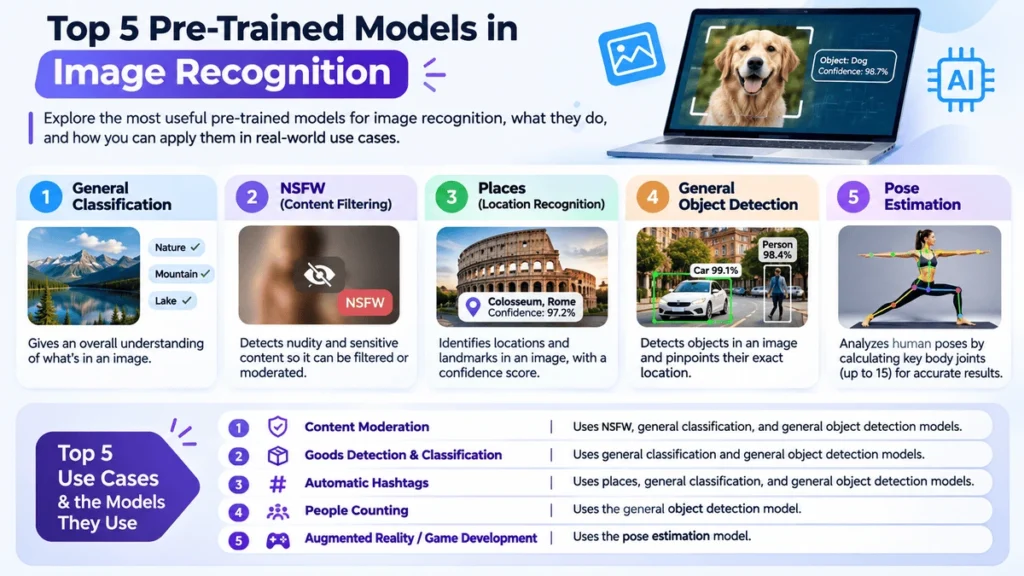
General Classification
The general classification model analyzes an image and predicts which categories best describe its content. It can be useful for organizing image collections, identifying products, and automatically categorizing visual content.
NSFW Image Classification
The Not Safe For Work (NSFW) classification model identifies potentially inappropriate images, including content containing nudity. It returns safe and unsafe predictions with confidence scores, which can help platforms develop automated content moderation workflows. However, it should not be treated as a complete moderation system without additional checks and human review where appropriate.
Places Classification
Places classification identifies the type of environment or location represented in an image. For example, it may recognize scenes such as beaches, offices, streets, forests, or other environments, depending on the categories supported by the model.
General Object Detection
General object detection identifies individual objects and their approximate positions within an image. Instead of returning only an overall image label, it can locate multiple objects using bounding boxes and provide associated prediction information.
Pose Estimation
The pose estimation model detects people and identifies important human body joints and keypoints. According to SentiSight.ai, its pose estimation model detects up to 15 joints and keypoints, making it useful for applications involving body position analysis and movement recognition.
Optical Character Recognition
The OCR model detects text within images and extracts the recognized content. It can support document processing, text extraction, and applications that need to convert visual information into readable data. Supported languages should be checked before using it for a particular project.
General Instance Segmentation
Instance segmentation identifies objects and separates their individual shapes at the pixel level. Unlike object detection, which typically uses rectangular bounding boxes, instance segmentation provides more detailed information about the visible boundaries of objects.
Background Removal
The background removal model isolates the main subject and removes the surrounding background. It can be useful for preparing product images, creating transparent-background graphics, and simplifying image editing workflows.
You can explore the available models and their capabilities on the SentiSight.ai pre-trained models page.
Top 5 Practical Use Cases of Pre-Trained Image Recognition Models
Pre-trained image recognition models can solve a wide range of practical problems. The most suitable model depends on the type of information an application needs to extract from an image.
1. Automated Content Moderation
Social media platforms, online communities, and content-sharing websites receive large numbers of user-uploaded images. Manually reviewing every image can be time-consuming and expensive. Image classification and NSFW detection models can help identify potentially inappropriate content and prioritize images for further review.
Useful models: NSFW classification, general classification, and object detection.
2. Product Detection and Classification
Online retailers and warehouses can use image recognition to identify products, sort inventory, and organize product photographs. For example, an automated system could identify different product categories and help place images into the correct sections of an online store.
Useful models: General classification, object detection, and instance segmentation.
3. Automatic Image Tagging and Hashtag Generation
Adding relevant tags to large image collections manually can take considerable time. Image recognition models can identify objects, locations, and other visual elements, allowing applications to generate suggested descriptions, keywords, and social media hashtags.
Useful models: Places classification, general classification, and object detection.
4. People Counting and Crowd Monitoring
Shopping centers, event organizers, transport facilities, and other organizations may need to estimate how many people are present in a particular area. Object detection models can identify individual people in images or video frames and support automated counting systems.
Useful models: General object detection and specialized people-detection models.
5. Augmented Reality and Game Development
Augmented reality applications and interactive games increasingly use computer vision to understand human movement. Pose estimation models can detect body keypoints and help applications respond to gestures, exercise movements, or player positions.
Useful models: Pose estimation and suitable real-time object detection models.
How to Choose the Right Pre-Trained Image Recognition Model
Selecting a pre-trained model should involve more than looking at its popularity or published accuracy. A model that performs well in one environment may not produce equally reliable results in another. Consider the following factors before making a decision.
- Define the task: Decide whether you need image classification, object detection, segmentation, OCR, or pose estimation.
- Check accuracy: Compare model performance using a dataset that represents your actual images and operating conditions.
- Consider processing speed: Real-time applications may require lightweight architectures with low inference latency.
- Evaluate hardware requirements: Consider available CPU, GPU, memory, and storage resources.
- Review model compatibility: Check supported frameworks, input formats, image dimensions, and deployment platforms.
- Understand licensing: Review the model license and any restrictions associated with its training datasets or commercial use.
- Test confidence scores: Determine whether prediction scores are sufficiently reliable for your application and whether additional validation is necessary.
It is also important to remember that a pre-trained model may not recognize every object or category relevant to your project. If its existing training categories do not match your requirements, fine-tuning or training a custom model may be necessary.
Pre-Trained Models vs. Custom-Trained Models
Both pre-trained and custom-trained models have an important role in computer vision. The right choice depends on the complexity of the task, available training data, development budget, and expected results.
A pre-trained model is generally a good starting point when an existing model already supports the required categories or visual task. It reduces the amount of development work and can often be used immediately for predictions.
A custom-trained model is more suitable when a project needs to recognize specialized objects, unusual product categories, or visual patterns that existing models do not handle reliably. Developers can collect relevant images, label the data, and train or fine-tune a model for the specific application.
In many cases, transfer learning provides a practical middle ground. It allows developers to reuse an existing model’s learned features and adapt them using a smaller, task-specific dataset.
Final Thoughts
Pre-trained models in image recognition have made computer vision more accessible by allowing developers to reuse existing AI capabilities instead of building every solution from scratch. Architectures such as ResNet, EfficientNet, MobileNet, Vision Transformer, and YOLO offer different approaches to visual recognition, each with its own strengths and limitations.
For businesses and developers, the most important step is choosing a model that matches the actual requirements of the project. Whether the goal is to classify products, detect objects, recognize text, count people, or analyze human movement, the right pre-trained model can significantly simplify development.
As computer vision continues to evolve, pre-trained models and transfer learning will remain valuable tools for building practical AI-powered applications across different industries.
Frequently Asked Questions (FAQs)
1. What are pre-trained models in image recognition?
Pre-trained models in image recognition are AI models that have already learned visual features from large image datasets. Developers can reuse these models to identify objects, classify images, detect text, or perform other computer vision tasks without training an entire model from scratch.
2. What are the five popular pre-trained models for image recognition?
Five useful model families are ResNet, EfficientNet, MobileNet, Vision Transformer (ViT), and YOLO. They support different computer vision requirements, including image classification, efficient on-device processing, and object detection.
3. What is the difference between image classification and object detection?
Image classification assigns labels to an entire image, while object detection identifies individual objects and locates them using bounding boxes. Object detection is more suitable when an image contains multiple objects that need to be identified separately.
4. Which pre-trained model is suitable for mobile applications?
MobileNet is a popular choice for mobile and edge applications because it is designed to reduce computational requirements and model size. However, the best option depends on the device, required accuracy, and processing speed.
5. Can pre-trained image recognition models be used without training?
Yes. Many pre-trained models can be used directly for predictions when their existing categories and capabilities match the application. Fine-tuning is only necessary when the model needs to adapt to specialized data or new recognition categories.
6. What is the difference between pre-trained and custom-trained models?
A pre-trained model has already learned from an existing dataset and can often be reused immediately. A custom-trained model is developed or adapted using data collected for a particular task, making it more suitable for specialized recognition requirements.
7. What is the best model for real-time object detection?
YOLO is a popular option for real-time object detection because it can identify and locate multiple objects in images and video. The appropriate model version and size depend on the required accuracy, hardware, and processing speed.
8. Are pre-trained image recognition models free to use?
Some pre-trained models and frameworks are available as open-source resources, while others require commercial licenses or paid access. Always review the model’s license, dataset terms, and platform pricing before using it in a commercial application.
“`